
How to Continue Using Gen6 While Our Google Verification Is in Progress
This workaround is temporary — full Google approval is underway.
Gen6 is currently completing Google’s OAuth App Verification process as part of our integration with Google Drive, Docs, and Sheets.
During this review period, some users may encounter a message stating “Google hasn’t verified this app” when attempting to connect their Google account to Gen6.
This is a normal part of Google’s approval workflow.
Nothing about your data, account security, or how Gen6 operates has changed. Once Google completes their review, this message will no longer appear.
Until then, here is how to proceed.
Step 1 — Click Advanced
When the “Google hasn’t verified this app” screen appears, click the Advanced link.
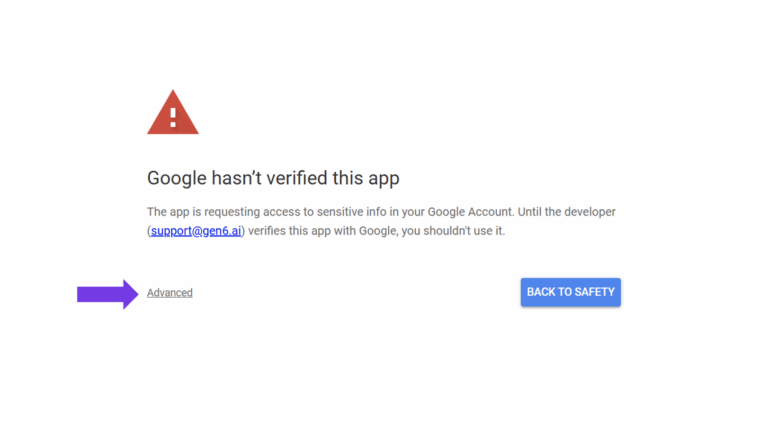
This reveals the option to continue.
Step 2 — Click Go to gen6.ai (unsafe)
You will then see the option to continue by selecting “Go to gen6.ai (unsafe)”.
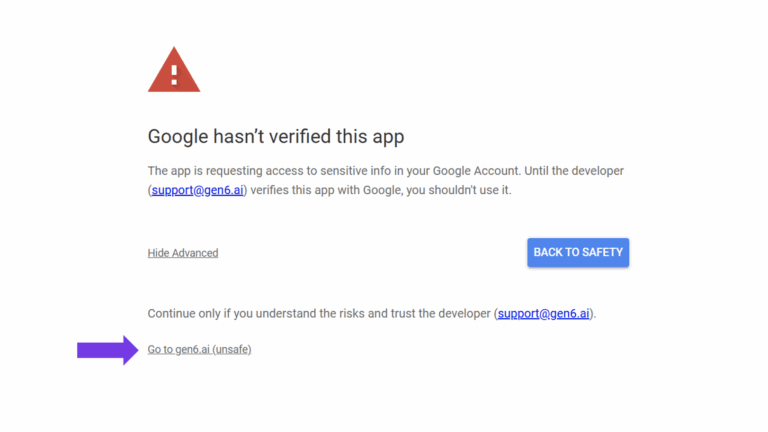
Despite the wording, this does not mean the site is unsafe. It only indicates that Google has not yet finished reviewing our documentation and scopes.
After clicking, you will return to Gen6 and everything will function normally.
Why this message appears
Google automatically displays this warning for apps whose OAuth scopes are still under review.
Gen6 is currently completing that process, which includes policy checks, scope justification, security validation, and platform review.
Once Google approves the verification, this message will be fully removed.
Your data remains secure
A few important points:
- Gen6 does not use your Google data to train AI models.
- All Google user data is isolated and encrypted.
- Gen6 complies with Google’s API Services User Data Policy, including Limited Use requirements.
- No changes have been made that affect the safety or privacy of your data.
This message is triggered solely by the pending verification status.
Timeline
We are in the final stages of Google’s review.
Once approval is completed, the verification warning will no longer appear for any user.
Thank you
We appreciate your patience while Google completes their standard verification process. If you have any questions, please contact us at:
support@gen6.ai