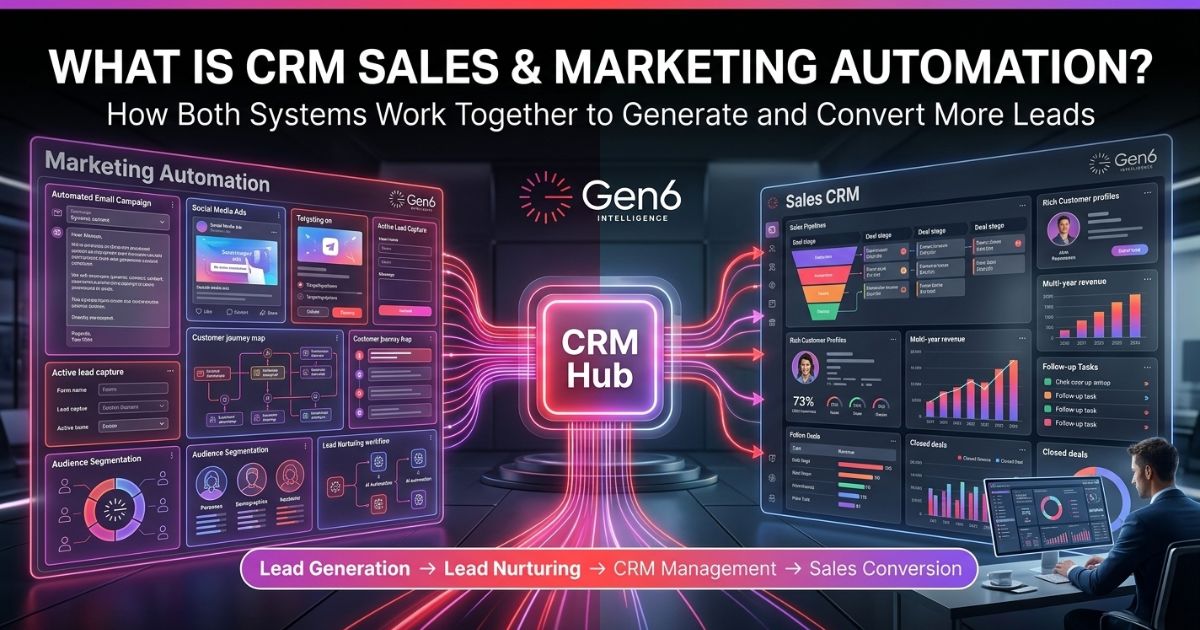
CRM sales and marketing automation provide the link from your business’s reach to its revenue in terms of technology. Using both CRM and marketing automation together will transform a set of disorganized activities into one coherent process based on data. This connection guarantees that each customer receives relevant data in an appropriate amount of time, so that your employees can focus on talking.
Why Most Teams Run CRM and Marketing Separately
Companies use a CRM solution and an additional email service that rarely work together. This creates a barrier that keeps sales and marketing teams separate.
- Zero context: Leads are passed to sales with no history of what they read or clicked.
- Blind spots: Marketing can’t tell which emails actually make money.
- Communication gaps: Teams have issues with repeating follow-ups or giving mixed messages.
- Delayed responses: If tools aren’t connected, leads may have to wait 2 to 3 times longer for an answer, which breaks their excitement.
If you are looking to fix this, learn more about Sales Lead Automation with AI.
What CRM Automation Actually Does
CRM automation manages the back half of the buyer journey. CRM software automation’s main objective is to eliminate the paperwork that prevents your team from selling.
- Lead Routing: Distributes new leads to appropriate sales representatives depending on their location or industry using CRM workflow automation.
- Automatic Logging: Maintains logs of all emails, calls, and meetings without the need to manually input the information.
- Activity Monitoring: Alerts a sales representative when there have been no further actions with respect to a deal for some time.
- Sales funnel automation: Automates the sales process when certain events occur, such as agreeing to a proposal.
Through the CRM software automation, the sales team will spend less time collecting information and more time with clients. Sales automation will result in a decrease in mundane work and increased efficiency.
What Marketing Automation Actually Does
Marketing automation handles the front end of your process. This ensures that the prospective customers see your product before they are ready to buy it.
- Automated Lead Nurturing: Depending on the content downloaded by the customer, it provides specific content streams.
- Lead Scoring: Prioritizes leads according to how interested they are and identifies who should be called for a sales talk.
- Lead Management Automation: Helps you stay on top of your leads by making sure you don’t lose track of any contacts.
- Scalable Outreach: Let a small team stay in touch with many potential clients at the same time in a personal way.
You can see how this scales your growth in our guide: AI Marketing Automation for Lead & Sales Growth.
How They Work Together: Step by Step
This unified approach creates a full-loop system where marketing and sales data live in one place. Here is how that looks in practice using CRM workflow automation:
- Capture: Lead captured by clicking on an advertisement and filling out the form.
- Nurture: Automated lead nurturing process through sending several helpful e-mails to nurture leads.
- Score: The system counts clicks. When a potential customer goes to the pricing page, their score reaches a “hot” level.
- Hand-off: CRM workflow automation triggers an alert to a rep, providing them with the full record of what the lead read.
- Close: The rep makes a targeted call, closes the deal, and the system logs the conversion to the original ad campaign through CRM software automation.
For more on the technical setup, visit Sales Workflow Automation & Lead Conversion.
What Breaks When They’re Disconnected
If your systems work independently of each other, then you end up fighting yourself as a team.
- Premature Outreach: Your sales team reaches out to people who have not completed their pre-research yet, making automated lead nurturing less effective.
- Wasted Budget: Without proper reporting, you can’t tell which campaigns produce sales automation conversions.
- Manual Friction: Sales funnel automation becomes a challenge because the CRM does not know about marketing initiatives.
- Lead Decay: Lead management automation cannot bridge the gap, leading to “stale” leads that your competitors will eventually poach.
The Role of Lead Management Automation
Lead Management Automation allows marketing leads to be associated with sales opportunities. It ensures that everything becomes well-documented and is recorded and monitored for action.
- 24/7 Response: Makes sure leads are contacted right away, no matter when it is.
- Data Hygiene: Cleans and formats lead data so your CRM stays organized.
- Unified Handoff: Makes the switch from marketing to sales seamless for the buyer.
- Continuous Tracking: Updates the record while the lead goes through your CRM software automation workflows.
Real Example: A Lead Goes From Ad Click to Closed Deal
Imagine a business owner searches for a specific software solution. They find your site, click an ad, and download a free guide. Marketing automation captures the info and initiates a helpful 3-day series of emails. On day four, they click a link to book a live demo.
- Immediate Action: The CRM automatically creates a new deal record.
- Full Context: Your sales rep receives a notification on their phone with a summary of the guide the prospect read through, and improved sales automation.
- Effective Engagement: The rep calls and addresses the exact pain point mentioned in the guide, building instant rapport.
- Efficient Result: The deal moves to “Proposal Sent” without a single manual data entry point through sales funnel automation.
How to Set This Up Without Starting Over
You do not need to replace your existing tools to get started. Most systems offer integrations that allow you to layer these automations over your current stack.
- Start Small: Plan one simple process: new lead → welcome email → add to CRM using basic CRM workflow automation.
- Layer Scoring: After you’ve set up the basics, add a system to rank your best chances.
- Sync Pipeline: Link your pipeline steps to marketing actions to get instant updates.
- Unified System: Gen6 helps link everything together, so you don’t have to use difficult and manual connections with powerful CRM automation.
- Advanced Implementation: Time to Scale Up? Leverage AI marketing automation and create a self-optimizing system where every engagement produces precision data.
Conclusion
Connecting your sales and marketing teams automatically is now essential for staying competitive, not just a nice option. By getting rid of separate data storage, you make sure that each interaction is important, easy to measure, and improved for getting results. Adopt a single plan today to make your sales process reliable and effective for generating income.
Gen6 Intelligence bridges your marketing and sales data, transforming fragmented efforts into a high-performance engine that drives repeatable revenue.
FAQs
What is CRM automation?
It uses software to automate manual tasks like data entry, lead routing, and follow-ups within your CRM.
How does CRM automation improve sales?
It eliminates administrative tasks, ensuring reps focus on high-value selling instead of manual data management.
Can CRM automation improve marketing performance?
Yes, it aligns marketing data with sales outcomes, allowing for better targeting and measurable campaign ROI.
What are the benefits of CRM sales automation?
Increased efficiency, faster lead response times, better data accuracy, and a more predictable, scalable revenue pipeline.
Which CRM systems support automation?
Most modern platforms like Salesforce, HubSpot, Zoho, and Pipedrive offer robust native and integrated automation capabilities.