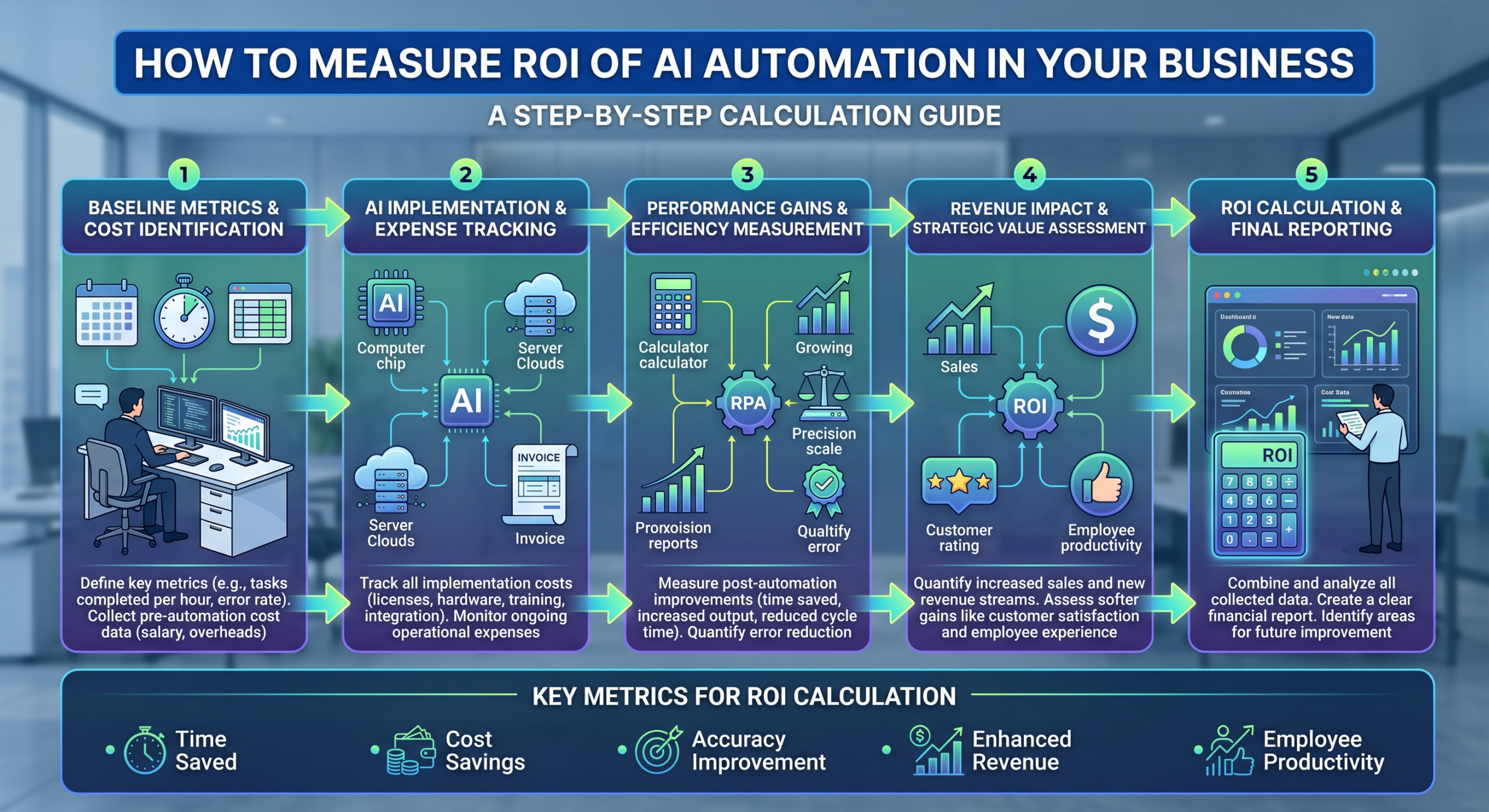
To measure AI automation ROI, compare the total cost of implementing and running your automation (software, setup, and maintenance) against the value it returns (hours saved, error reduction, and revenue impact) over a fixed period, typically expressed as a percentage using ROI = (Net Benefit ÷ Total Cost) × 100.
Increasing spending on software and more pressure from leaders have made calculating AI automation ROI a top priority. Looking at your technology tools isn’t just about what they can do anymore; business owners want to understand if they’re getting their money’s worth. True ROI goes beyond just looking at license fees to examine how saved time and smooth processes improve your profits by increasing efficiency, lowering costs, and helping your business grow faster.
Why Most Businesses Get AI Automation ROI Wrong
Many teams approach automation by simply celebrating the “go-live” date without tracking the actual impact on their bank account. This usually results in a gap between the apparent success rate of the product and its profit rate.
- Tracking the Wrong Metrics: People often claim that “we automated X” is a milestone, but do not calculate how much time or money they saved through this automation process.
- Missing Baselines: Without measuring how much time was needed to accomplish the job manually, it will be impossible to evaluate how the situation improved.
- Ignoring Soft Benefits: Some benefits that are difficult to quantify, such as employee satisfaction, reduction in errors because of tiredness, and faster reaction time, are not included in ROI calculations.
- Speed Disconnects: While business process automation makes a system work 24/7, most businesses fail to translate this speed into an actual productivity metric or measurable operational impact.
To learn more about the common pitfalls that prevent teams from realizing these gains, take a look at our guide on why most automation projects fail.
The AI Automation ROI Formula (and How to Use It)
Calculating AI automation ROI requires a structured look at both your output and your overhead. To truly understand your automation return on investment, you need to look at more than just the price of the software. An AI automation strategy involves several layers of value and cost.
ROI (%) = [(Total Benefit − Total Cost) ÷ Total Cost] × 100
- Total Benefit = Labor hours saved (× hourly rate) + Error/rework cost avoided + Additional revenue enabled + Faster cycle-time value.
- Total Cost = Software/platform cost + Implementation & setup cost + Training cost + Ongoing maintenance cost.
Many teams mistakenly calculate a lower “Total Cost” because they forget to include expenses for training or maintenance. They also underestimate “Total Benefit” by not considering how much work an automated process can help them avoid doing again.
Metrics to Track Before and After Automating
Relying solely on cost reduction paints an incomplete picture. To truly understand your AI automation benefits, Gen6 recommends a balanced dashboard of operational indicators.
| Category | Metric | How to Track |
| Time | Hours spent per task/process | Time tracking or task logs, pre/post automation |
| Cost | Cost per transaction or ticket | Total ops cost ÷ volume |
| Quality | Error/rework rate | % of tasks requiring correction |
| Speed | Cycle time | Time from trigger to completion |
| Growth | Revenue per employee/capacity freed | Output volume before vs. after |
| Adoption | % of process actually automated | Automated steps ÷ total steps in workflow |
Automated steps ÷ total steps in workflow
Track at least one metric from each category to see the full operational footprint of your software. For more insights on how these metrics translate into financial relief, read our breakdown on How Workflow Automation Reduces Operational Costs.
Step 1: Establish Your Pre-Automation Baseline
Before launching any new AI automation software, you must define your current operational reality. If you don’t have a starting point to compare to, then success after launching is just a guess.
- Document Everything: Keep track of how much time you spend on each task, how often mistakes happen, and the actual cost of the process.
- Run a Two-Week Audit: Go through your team’s work by hand for two weeks before changing any processes to make sure your initial information is correct.
- Avoid Assumptions: Do not rely on industry-wide averages; base your success on the specific, real-world data generated within your own company.
Step 2: Track Time and Cost Savings
Calculating workflow automation cost savings involves more than just counting minutes. You should think about how improvements in efficiency affect your whole business.
- Calculate Fully-Loaded Costs: Multiply hours saved by the fully-loaded hourly rate of your employees who execute the processes, including benefits and overheads.
- Factor in Indirect Savings: Consider less switching in context, reduced overtime payments, and decreased requirements for temporary workers during peak periods.
- Recognize Compound Gains: As automation processes operate without pauses, the savings are compounded over an entire month instead of just per process.
Step 3: Measure Quality and Error Reduction
People make costly mistakes, and keeping track of them is important for understanding the advantages of modern tech integrations. With fewer mistakes, you will have greatly decreased the cost savings automation brings to manual reviews.
- Track Rework Rates: Look at the ratio of invoices, leads, or records that need manual changes.
- Calculate Costs: Multiply the amount of time required to correct a mistake by the hourly wage of your workers.
- Include Risk Benefits: Consider the advantages of meeting more deadlines and having organized records that help you avoid problems with rules and regulations.
Step 4: Calculate Revenue and Growth Impact
When you streamline operations, you aren’t just saving time; you are creating capacity. Redirecting this energy is the final step in calculating your financial yield.
- Redirect Capacity: Quantify what your team now produces with the hours they gained back from automated workflows.
- Link to Conversion: Measure if faster lead follow-ups or quicker support resolutions lead to higher conversion or client retention rates.
- Keep Data Focused: Only include revenue growth that can be reasonably attributed to the automated process, rather than broad company growth.
Illustration Example: Calculating ROI for a Workflow Automation
To put the formula into practice, let us walk through an illustrative workflow example, such as processing incoming client onboarding paperwork. The figures below are placeholders for the business’s actual baseline and post-automation results.
| Metric | Before Automation | After Automation |
| Hours spent per week | Actual hours | Actual hours |
| Labor cost saved per month | Not applicable | Hours saved × hourly rate |
| Error/rework rate | Actual rate | Actual rate |
| Software + setup cost | Not applicable | One-time + monthly cost |
| Net monthly benefit | Not applicable | Total benefit − total cost |
| ROI | Not applicable | Net benefit ÷ total cost × 100 |
Replace the placeholders with your actual workflow data to calculate the real ROI of automation.
Is AI Automation Worth It? Benchmarks to Expect
When leaders ask is ai automation worth it, they are looking for dependable, realistic benchmarks. Most businesses see measurable results quickly if the process is well-defined.
- Timeline to Results: While most companies achieve full ROI within 90 days, you can better manage expectations by understanding the typical timeline of how long it takes to implement AI automation.
- Compound Efficiency: Remember that setup costs are largely one-time, while efficiency gains repeat every single month.
- Process Quality Matters: A positive return is realistic for most repetitive processes, provided the workflow was properly mapped before software deployment began.
Conclusion
At Gen6, AI automation ROI is no longer just about looking at software costs. It’s now about understanding the total money-saving power from saved time, fewer mistakes, and faster growth. By setting clear starting points, considering all expenses, and keeping track of important performance measures, your business can change automation from a source of costs into a reliable, successful part of your operations.
Gen6 transforms AI automation from a cost center into a proven profit driver, turning saved time and flawless execution into measurable, compounding growth.
FAQs
1. How do you measure the ROI of AI automation?
Calculate total financial benefits minus total costs, divide by total costs, and multiply by 100.
2. What is a good ROI for automation?
A positive return exceeding 100% within the first few months is standard for well-mapped workflows.
3. How long until AI automation pays for itself?
Most businesses achieve full financial recovery within three to five months of deployment.
4. What metrics should I track for automation ROI?
Track time spent, cost per transaction, error rates, cycle time, and team capacity freed.
5. Is AI automation worth the investment?
Yes, it replaces manual overhead and recurring errors with continuous, scalable operational speed.
6. What are the cost savings of AI automation?
Savings include reduced labor hours, lower rework costs, and fewer contractor or overtime expenses.