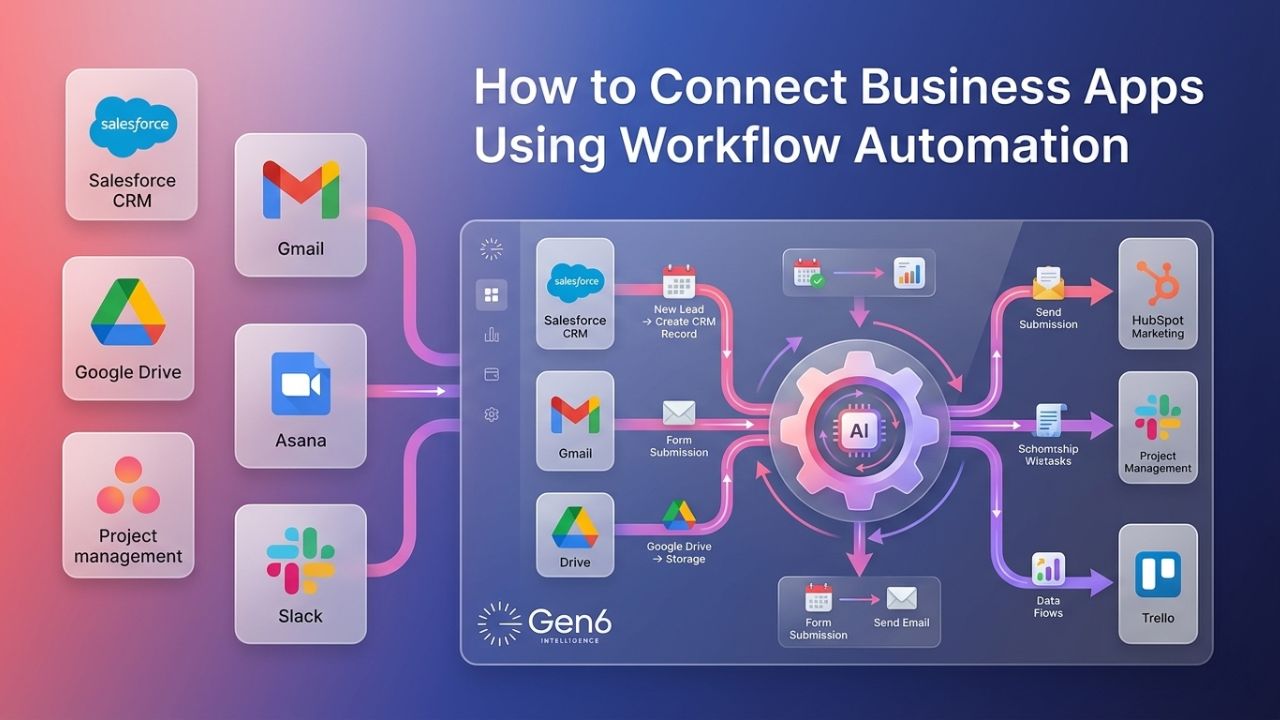
If your company is still manually transferring data from one tool to another, you’re losing precious time every day. Connect Apps workflow automation enables your tools to communicate and transfer data automatically. This process is known as app integration automation. Automation enables your messaging applications, spreadsheets, and CRMs to coordinate their work with simple instructions and helps automate business tools efficiently.
Zapier, Slack, Google Sheets, and Gen6 Intelligence are some of the workflow integration tools that firms can use to streamline their processes and eliminate human intervention.
Why Your Business Apps Need to Talk to Each Other
Most businesses lack connectivity between those applications despite working with several tools for managing work, even when using modern workflow integration tools.
Common challenges businesses face:
- Teams manually copy data between apps.
- Leads or updates get delayed across systems.
- Information is stored in separate places.
- Human errors increase with repetitive work.
- No real-time visibility across departments.
When apps don’t work together, workers spend more time handling the tools instead of getting their work done. Using automatic business tools and methods helps to smoothly share data between systems and automate business tools while enabling CRM integration automation.
What Is Workflow Automation?
Workflow automation involves developing simple guidelines to enable your applications to perform actions automatically upon the occurrence of an event. You can refer to it as a “Trigger-Action” relationship:
- Trigger: Something happens (like a new person fills out a contact form).
- Action: The system takes action (like adding that lead to your CRM, sending a message in Slack, and recording the entry in Google Sheets).
Old tools like Zapier made this popular, but newer platforms like Gen6 Intelligence go even further. Gen6 doesn’t just move data; it uses AI helpers to manage complicated tasks and make decisions that regular tools can’t handle while helping businesses automate business tools.
How to Connect Your Apps: Step-by-Step
You don’t need a computer science degree to create strong connections between different systems using modern workflow integration tools. Here’s how to make your business tools work automatically:
Step 1: Identify your workflow
Identify a routine activity that causes you to be late. To understand the beginning, development, and outcome of the process, divide the activity into smaller steps.
Step 2: Choose your trigger app
Select the application or system that will automatically initiate the automation process when certain events occur. These can include a CRM system, your email inbox, or a forms submission tool that immediately detects any incoming data and supports CRM integration automation.
Step 3: Define your action(s)
Choose what should happen right after the trigger starts your workflow. You can choose to do things like send alerts, change information in spreadsheets, make new records, or start several tasks one after another.
Step 4: Connect the platforms
To link the starting application and finishing application for the process, you must use a tool. To ensure proper and accurate data transfer, data components must be placed correctly.
Step 5: Launch and test
To ensure that the entire process runs smoothly, a thorough test must be conducted. The process can then be deployed and describe workflows automatically while you automate business tools and scale workflows.
Gen6’s AI agent builder allows you to describe the workflow in a simple way. The platform drafts the logic for you, so you simply connect your accounts and go.
Real-World Use Cases of Workflow Automation
| Trigger | Action | Tools |
| New CRM lead | Slack alert to the sales team | Gen6 Intelligence + Slack |
| Form submission | Add row to Google Sheets | Gen6 Intelligence + Google Sheets |
| New support ticket | Assign to rep + log in CRM | Gen6 Intelligence + CRM |
| Invoice paid | Update project status | Gen6 Intelligence + Accounting Tool |
Which Workflow Integration Tool Is Right for You?
| Tool | Best For | AI-Powered? | No-Code? |
| Gen6 Intelligence | Complex, multi-step intelligent workflows | Yes | Yes |
| Zapier | Simple trigger-action automations | Limited | Yes |
| Make | Visual workflow builders | No | Yes |
| Custom API | Developer-built integrations | Optional | No |
If you want to create more advanced workflows that can make decisions and handle more steps, then Gen6 Intelligence is a better option than basic workflow integration tools like Zapier or Make.
How Gen6 Intelligence Improves Workflow Automation
Gen6 is different from regular tools because it is made to be easy to use and grow with you. Instead of creating workflows one step at a time, you can simply explain what you want in everyday words.
Main advantages:
- Quicker process setup.
- Simpler for people who aren’t tech experts.
- Manages tasks that happen in several steps automatically.
- Brings together CRM, chat, and data tools in one place with strong CRM integration automation.
It makes it easier for growing teams to use CRM integration automation quickly without it being complicated.
Conclusion
With Connect Apps, businesses can get rid of boring tasks and bring all their tools together in one place. Regardless of whether you use Gen6 Intelligence, Slack, Google Sheets, or even Zapier, the ultimate goal will remain unchanged to simplify the process and increase its efficiency. Application integration automation allows one to connect all these applications, work faster, and make fewer mistakes without possessing any programming skills.
FAQs
1. How to integrate apps using workflow automation?
Use tools like Zapier or Gen6 to connect apps through triggers and actions.
2. What tools connect business apps without coding?
Zapier, Make, Slack integrations, Google Sheets, and Gen6 Intelligence enable no-code app connections.
3. How to automate workflows between apps?
Set triggers in one app and actions in another using automation platforms.
4. What is the easiest way to connect multiple apps?
Use no-code workflow tools with drag-and-drop or plain-language automation builders.
5. Can I automate app integration without developers?
Yes, no-code platforms let you build full integrations without any programming skills.