Discord webhooks are a quick way to turn information into real-time alerts you can use. They serve as a link between your outside tools and your team’s workspace, making it unnecessary to look at many dashboards. Whether you are keeping an eye on sales, checking on servers, or getting insights from AI, webhooks send you important information right where you chat, supporting smooth Discord automation.
What Is a Webhook?
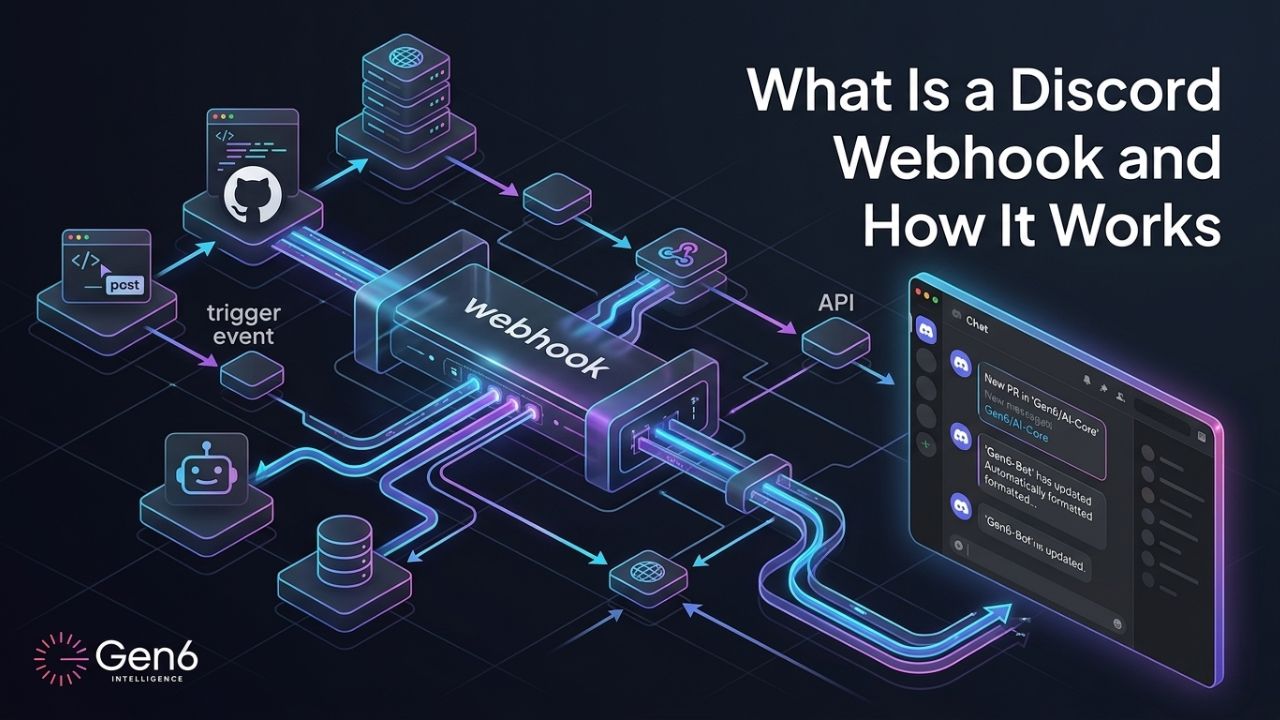
A webhook is a special link from Discord that waits for new information. When something happens in another app, that app sends details to the webhook URL. Discord takes that information and creates a message in a channel, which is the core idea behind webhook integration.
An analogy to understand webhooks easily:
- Imagine a webhook like a doorbell.
- Something happens → the doorbell rings → Discord gets the message right away.
Bots require you to sign in, allocate servers, and run various processes, while webhooks can be lighter and simpler to use due to their functionality. Discord webhook technology allows for efficient messaging.
How Does a Discord Webhook Work?
The best thing about a webhook is its simplicity. It has a straightforward way to communicate that doesn’t require a working bot or complex webhook integration.
- Event Trigger: A certain action happens, like when someone fills out a new customer form or when an AI report is finished.
- HTTP POST Request: The source app sends a small, organized piece of data in JSON format to your chosen Discord webhook URL.
- Payload Parsing: Discord gets the data and breaks it down into parts, like the username, the message, and any pictures included.
- Instant Delivery: The message is created and sent right away to the channel you picked.
Webhook Example: Real-World Use Cases
A webhook example is best understood through the lens of productivity. Many teams lose hours manually checking for updates, but webhooks handle the monitoring for you.
- E-commerce & Sales: When a customer buys something, automatically send a message to a private “Sales” channel right away. The message will include the order amount and the customer’s details.
- AI-Powered Insights: With Gen6 Intelligence, you can use AI to take care of business tasks. Your AI agents can send final summaries or useful information straight to your team’s Slack-like platform.
- Operational Logs: Link your server monitoring tools or GitHub projects to send real-time error messages to a “DevOps” channel so your engineers can spot problems before they get worse.
Discord Automation With Zapier, IFTTT & Gen6
While basic tools connect one trigger to one action, modern business automation often requires more power through Discord automation.
| Tool | Webhook Support | Best For | Complexity |
| Zapier | ✅ Native | Simple trigger-action flows | Low |
| IFTTT | ✅ Native | Personal automations | Very Low |
| Gen6 Intelligence | ✅ Advanced | Multi-step AI business workflows | Low–Medium |
Zapier and IFTTT are good for easy, one-step notifications. Gen6 Intelligence goes further by integrating webhooks into multiple platforms and providing workflows that go far beyond a webhook example implementation.
Discord Webhook vs Bot: Key Differences
Many people ask why not simply use a bot? Below is the answer:
- Setup Time: It takes only two minutes to create a webhook, but building a bot can take several hours.
- Hosting: The good news is that you get free hosting with Discord for your webhooks; you have to create your server to host your bots, though.
- Capabilities: Bots can read messages and converse with humans,s while the use of webhooks is limited to the automation of sending notification messages.
Discord webhooks will serve your purpose if you want to send messages that are quick, reliable, and automated. If you want to let bots listen to you or communicate with other users in the channel, then you should make use of bots.
How to Set Up a Discord Webhook
- Open Discord: Tap on the settings icon adjacent to the name of the channel once Discord opens.
- Integrations: Choose Webhooks from any webhook integration by going to the integrations section.
- Create: Create a new Webhook by choosing”New Webhook.”
- Copy URL: Click on Copy Webhook URL.
- Connect: Add this connection to your automation software (Gen6, Zapier, IFTTT), enabling Discord automation.
- Test: Take advantage of the “Send Test” feature in your software to check that the message appears on your Discord channel.
Conclusion
Using the webhooks of Discord turns your chat room into a highly effective command center. This allows for a fast and simple way to stay updated within your team, all without having to go through the trouble of making your own bot. This entire webhook example shows how easily modern workflows can be automated. Begin linking your favorite tools today and enjoy easy, automatic communication.
FAQs
1. What are the best AI marketing tools in 2026?
Top AI marketing tools include HubSpot, Mailchimp, Jasper, and Gen6 Intelligence for automation.
2. Which AI tools are used for digital marketing?
Tools like HubSpot, Mailchimp, Jasper, Canva AI, and Gen6 automate digital marketing tasks.
3. What is the best marketing automation platform?
HubSpot is widely considered the best marketing automation platform for businesses.
4. How to choose the right marketing automation tool?
Choose based on budget, features, integrations, scalability, and ease of use.
5. Are AI marketing tools good for startups?
Yes, they help startups automate tasks, save time, and scale faster.