To build an AI workflow today, you no longer need a computer science degree or a massive IT budget. No-code automation has evolved from simple “if-this-then-that” rules into intelligent systems that think and adapt. For those seeking workflow automation for beginners, the Gen6 AI workflow builder acts as a bridge, solving the core business pain point: teams wasting hundreds of hours on repetitive, manual data entry.
Why Businesses Are Moving to No-Code AI Automation in 2026
The landscape of business efficiency has shifted because traditional automation often breaks when faced with complex, messy data. As of 2025, the majority of workflows remained manual because they required “human-like” judgment that basic bots couldn’t provide. To build an AI workflow that lasts, companies are looking for more than just scripts.
- Adaptive Intelligence: Unlike older tools, workflow automation for beginners uses smart agents that keep working even when a process changes.
- Speed to Market: Non-technical teams in HR, sales, and hiring can now set up a complicated AI workflow builder in just a few hours instead of taking months.
- Developer Independence: The Gen6 no-code AI platform business “describe → connect → launch” model removes the need for expensive engineering oversight while scaling process automation.
What Is an AI Workflow and Why Does It Matter?
An AI workflow is a sequence of automated tasks where smart programs do most of the work. It’s the natural development of how we build AI workflow, changing from fixed scripts to systems that can understand, think, and respond to information. To get a deeper sense of the mechanics, you can explore what no-code automation is to see how these systems operate without a single line of code.
- Beyond Rules: Standard automation saves a file, while an AI process reads the file, understands the feelings in it, and chooses what to do next.
- Beginner Friendly: Gen6 makes workflow automation for beginners accessible by handling the complex logic in the background.
- Versatile Execution: Use it for everything from process automation to auto-scoring leads and drafting multi-language recruitment outreach.
Step 1: Describe Your Workflow in Plain Language
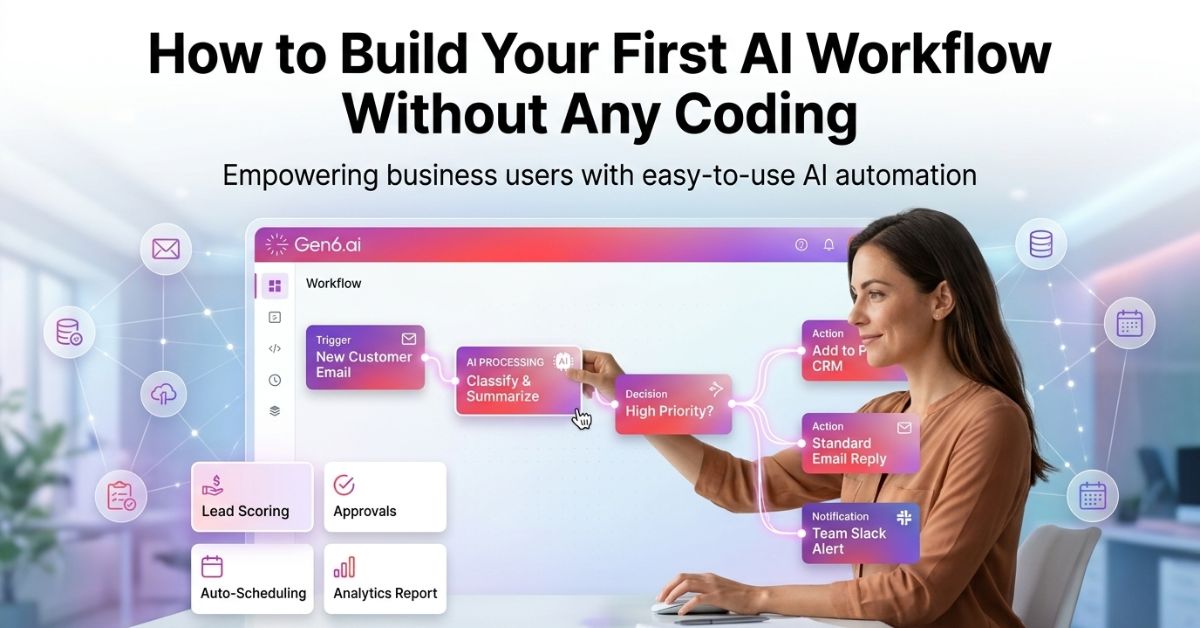
The first step to building an AI workflow is no longer drawing a complex flowchart. Using the Gen6 Intelligence AI workflow builder, the process starts with a simple conversation where you tell the platform what you need in your own words.
- Natural Input: Open Gen6 AI, click “New Workflow,” and type: “When a lead fills out my form, research their company and update HubSpot.”
- Instant Drafting: This workflow automation for beginners generates the entire logic path from your sentence, with no JSON or coding required.
- Accessibility: This no-code automation approach means your idea becomes a blueprint in seconds.
Step 2: Connect Your Business Apps
For effective process automation, your AI needs to live where your work happens. Integrating your current software stack into the AI pipeline is much easier than ever before with “point-and-click” technology instead of having to deal with the dreaded “API hell.”
- Deep Integrations: Connect to Salesforce, Hubspot, Slack, LinkedIn, and cloud storage right away.
- Centralized Control: Control your no-code AI platform business permissions and connections from one single, secure workspace hub.
- Enterprise Security: Your data stays fully encrypted and SOC 2 compliant.
Step 3: Launch and Automate
You need to enable your no-code AI platform for your business after you select a strategy and integrate the applications. This is where you witness the immediate impact of AI-driven efficiency. Scale effectively with business process automation using AI to transform departments into high-speed, autonomous, and efficient units.
- Triggers: An AI workflow trigger can be initiated by any external event, time-dependent process, or external API call.
- Live Monitoring: To build AI workflow precision, you will monitor everything that occurs live.
- Seamless Iteration: To change the process, simply edit your plain-language description and re-launch.
Best Use Cases for No-Code AI Workflows
The versatility of a modern AI workflow builder allows it to touch every corner of an organization. Using no-code automation for process automation results in dramatic time savings across various departments.
| Department | Workflow Example | Time Saved |
| HR | New hire onboarding + IT access | Up to 60% admin reduction |
| Sales | Lead scoring + CRM auto-update | Hours/week per rep |
| Recruitment | Resume ranking + interview scheduling | Days per hire cycle |
| Marketing | Multi-channel campaign orchestration | Campaigns in hours, not weeks |
| Support | FAQ bot + ticket routing | Instant 24/7 responses |
Gen6 vs Traditional Automation Tools
When comparing a modern AI workflow platform to legacy systems, the difference is clear. While traditional tools require technical expertise, Gen6 is built for the no-code AI platform business user who needs results fast.
- Setup Speed: Traditional tools take weeks; Gen6 takes minutes.
- Complexity: Legacy systems break on exceptions; AI agents adapt to them.
- User Access: Gen6 is built for everyone, not just the IT department.
- Cost: No developer overhead means a much higher ROI on every automated task.
Where to Start: Free Templates That Work Instantly
If you want to build an AI workflow but aren’t sure where to begin, templates are the perfect entry point. These are designed for workflow automation for beginners with the aim of automating processes, so that you do not have to begin right from scratch.
- One-Click Activation: Activate bots for resume screening, lead grading, and FAQ management with a single click.
- Department Focus: Pick from a no-code AI platform business for specialized templates for HR, Sales, and Research.
- Instant Scalability: Begin with a template and adjust it as your business expands.
Conclusion
Creating your first AI process is not just a technical challenge anymore; it’s now a smart advantage for your business. Using the Gen6 AI workflow builder, teams can turn boring manual tasks into accurate automated processes. Creation of something new would be in the hands of people capable of explaining ideas, connecting them, and starting projects without programming anything using computers.
FAQs
1. Can I build an AI workflow without technical skills?
Yes. Modern platforms use natural language processing, meaning that if you can write an email, you can build a workflow.
2. What is the easiest AI workflow builder for beginners?
Gen6 is currently the leader for natural language “describe-to-build” automation.
3. How long does it take to build a workflow on Gen6?
A basic lead-management or research workflow can be launched in under 15 minutes.
4. What workflows should I automate first in my business?
Start with repetitive data entry or manual research tasks that take humans hours but take AI seconds.