Are you tired of waiting for things to move slowly and relying on IT for some simple applications? You don’t need to keep waiting till the engineers catch up with your needs. With the help of no-code workflow automation, you can build a workflow management system to control your productivity yourself. This guide helps you learn the basic steps to create, build, and launch automated systems that will work for you.
Why Teams Are Ditching Custom Dev for No-Code
Everybody has faced the issue of getting approvals trapped within emails or shared spreadsheets that get messed up when two users try to modify them simultaneously. Waiting for the engineers to complete six weeks’ worth of work just to do some small thing is an enormous waste of time.
- Don’t wait for IT: Create your own tools using no-code business automation.
- Empower your team: Citizen developers in ops or sales can now manage their own tooling using a reliable no-code workflow builder.
- Work smarter: Automate ticket routing or lead handoffs without bothering developers.
- Focus on the build: You no longer need to create automation without developer support as a side hustle; it’s now the standard for shipping internal tools.
What You Need Before You Start
Before starting a no-code workflow builder, you should have your ducks in a row. It will save you many hours of going back and forth.
- Process map: Be completely clear on all the steps.
- App list: Identify all the applications currently involved in the manual process.
- Time Block: Set aside 30 minutes for laser focus.
- Knowledge Check: Take a look at our article explaining what no-code automation really means.
Step 1: Map the Process You Want to Automate
Before touching any tool, write down exactly what happens today. If you skip this, you’ll just end up with a faster version of a broken process. People often overlook the “small” manual steps, but those are exactly what the computer should be doing for you.
- Document every step: Include the tiny, annoying manual copy-paste tasks.
- Bottleneck identification: Find areas where work regularly gets stuck and needs human input.
- Whiteboard it: Illustrate the process on a sheet of paper or any other tool.
- Keep logical: If you cannot describe the workflow in words, you are not ready to create automation without developer intervention.
Once the process is mapped clearly, the next step is breaking it down into the two building blocks every workflow is made of.
Step 2: Pick Your Triggers and Actions
You need to know what triggers and actions are to learn how to automate workflows without coding. Workflows are just a sequence of such components; after you learn that, no-code business automation becomes clear to you.
- The Trigger: The event that initiates the process (new form submission, new status in your CRM, or new email).
- The Action: The action that should be carried out after this (automated emailing, creation of calendar events, or updating the database record).
- Logic flow: If you can verbalize the logic, you can build it. Mastering this is key to automating workflows without coding.
With triggers and actions defined, it’s time to actually assemble them.
Step 3: Build It With a Drag-and-Drop Workflow Builder
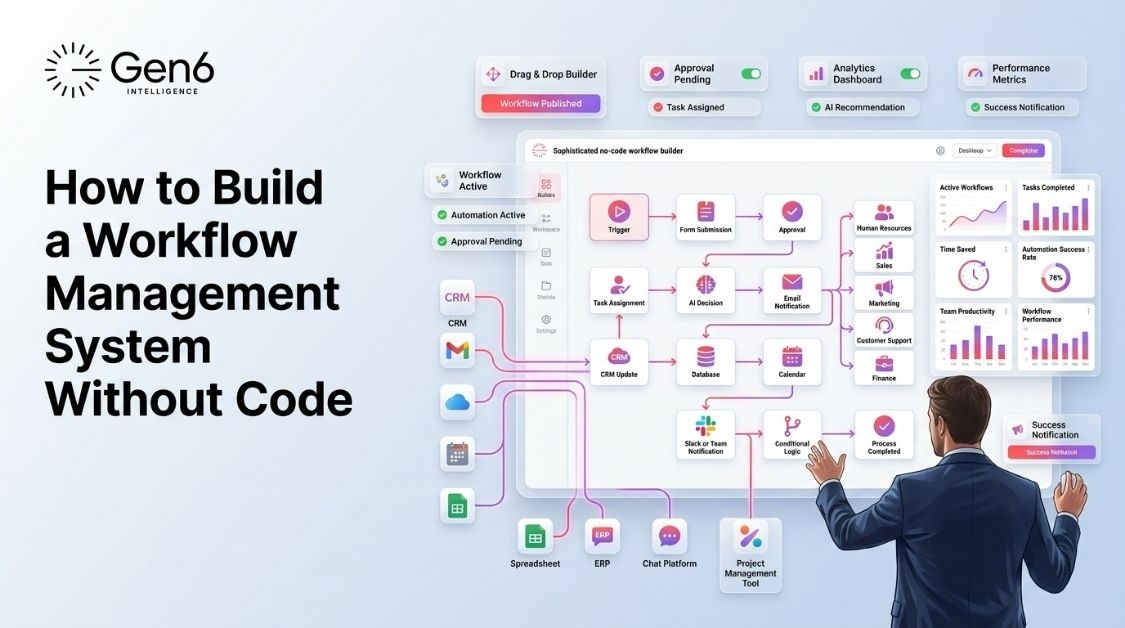
This is where your vision becomes a reality. You don’t need to write a script; you just assemble the blocks. Use the Gen6 workflow builder to visualize your logic before you turn it on.
- Open your canvas: Use a drag-and-drop workflow builder to map your logic.
- Snap it together: Connect your trigger to your first action.
- Add conditions: Set filters like “only run this if the deal size is over $10k.”
- Visualize: Use the drag-and-drop workflow builder to see the path clearly.
Once the logic is built, the next piece is making sure your apps can actually talk to each other.
Step 4: Connect Your Apps With API Integrations
API integration is what keeps your system connected. They ensure that information flows smoothly between your CRM system, emails, and spreadsheets, so you’re always working with the most up-to-date information.
- No manual tokens: Gen6 manages the secure connections for you.
- Data syncing: Keep your apps talking in real-time to facilitate no-code workflow automation.
- Centralization: Learn more about connecting business apps with workflow automation.
With the plumbing in place, the last layer is handling the parts of the process that need actual judgment.
Step 5: Layer in AI Agents for the Judgment Calls
Rules are good, but there are times when the job calls for human judgment. This is where AI agents excel. Think of this as the final layer to create automation without developer intervention for complex tasks.
- Contextual reading: AI can classify support tickets based on their tone or priority.
- Summarization: Let AI write the summary for a lead before sending it to your inbox.
- Smart routing: Let the AI decide which department handles the request.
- Expand your reach: Leverage AI to improve your no-code business automation strategy. See how to create an AI workflow.
Even with all five steps done well, a few habits tend to trip up first-time builders, worth flagging before you launch.
Common Pitfalls to Avoid
Avoid the following mistakes to make sure that your system remains stable and efficient as your company scales up.
- Fixing a broken process: Do not automate a disorganized process, but fix it first.
- Ignoring errors: Always create an error path in your no-code workflow builder.
- Over-complicating: Create multiple small-scale workflows rather than a single huge one.
- Testing blindly: Always test using actual data rather than dummy text.
Where Gen6 Fits Into All This
Gen6 gives you the tools to build a workflow management system in an afternoon. When you need to create automation without developers’ help, we have a platform for that.
- All-in-one: Builder, integrations, and AI in one interface.
- Speed: Go from idea to live system in hours, not weeks.
- Accessibility: Designed for anyone who knows their own business processes.
If you are ready to learn how to automate workflows without coding, Gen6 makes the process seamless. Start your journey into no-code workflow automation and master no-code business automation today.
Start building for free on Gen6 →
Conclusion
Building an effective workflow management system is not just a task for engineers anymore. With the help of process mapping, drag-and-drop workflow builder, and artificial intelligence, you can make all the manual work turn into automatic and effective procedures. This guide on how to automate workflows without code will give you a start to save time.
FAQs
Can you build a workflow management system without coding?
Yes, no-code platforms let you create and implement complicated automation workflows without ever writing code.
What is a no-code workflow builder?
This is a visual tool allowing one to create workflows and automate processes with drag-and-drop elements.
How do I automate a business process without a developer?
First, map your manual steps; secondly, choose your triggers; then, choose your actions and connect your tools using no-code.
What skills do I need to build automation workflows?
You only need a deep understanding of your business processes and the logic of your specific manual tasks.
Is no-code automation secure for business data?
Leading no-code builders use encrypted, secure API connections to ensure your business data remains protected during automated transfers.